Google Business Profile: Everything You Need to Know
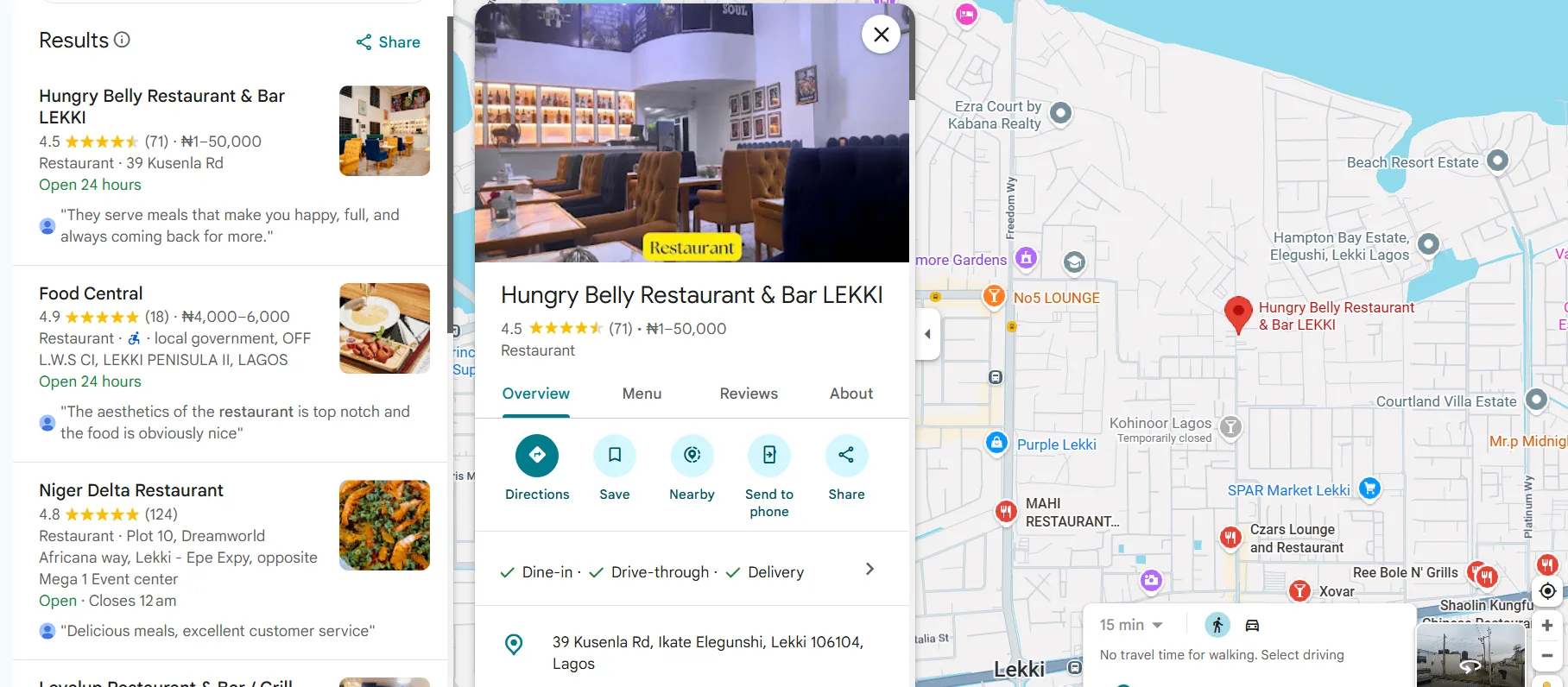
A Google Business Profile (GBP) is a free listing that controls how your business appears on Google Search and Google Maps when customers search for you or businesses like yours. It displays your name, address, phone number, hours, photos, reviews, and services in a structured panel – before a customer ever visits your website. For small and medium-sized businesses across Africa and beyond, a well-managed profile is often the single most effective tool for getting discovered by local customers at the exact moment they are ready to buy.
What Is Google Business Profile?
Google Business Profile is a free tool from Google that lets business owners manage how their business appears across Google Search and Google Maps, including business name, location, contact details, hours, photos, reviews, and services.
Formerly known as Google My Business, the platform was rebranded to Google Business Profile in 2021. The core function remains the same: when someone searches for your business name, or for a category of service near them, Google surfaces a profile card with your essential information.
For a restaurant in Nairobi, a clinic in Lagos, a salon in Accra, or a law firm in Johannesburg, that profile card is often the first thing a potential customer sees. It shapes their first impression before they click anything.
Who Is Eligible for a Google Business Profile?
Google Business Profile is available to businesses that interact with customers in person, either at a physical location or by visiting customers directly. The eligibility rules are specific, and understanding them matters before you create a listing.
Brick-and-Mortar Businesses
Any business with a physical storefront or office that customers can visit is eligible. This includes retail shops, restaurants, hotels, clinics, salons, gyms, banks, and professional service offices. You must use your actual business address – not a P.O. box.
Service-Area Businesses
Businesses that visit customers rather than hosting them – plumbers, electricians, delivery services, mobile technicians – are also eligible. These are called service-area businesses. They can hide their physical address and define the geographic areas they serve instead.
One important rule for service-area businesses: you are only eligible for one profile unless you operate completely separate teams serving non-overlapping areas. Creating multiple listings for the same team serving different neighborhoods violates Google's guidelines and can result in suspension.
Less Common Business Types
- Food trucks and virtual kitchens: Eligible as service-area businesses. Set up the listing using a home or kitchen address and hide the address from public view.
- Kiosks: Eligible if they have a permanent location and their own contact information.
- Seasonal businesses: Eligible. Set seasonal hours and mark the business as temporarily closed during the off-season.
- Coworking space tenants: Evaluated case by case. You must have permanent signage, a unique phone number, and staff present during all stated business hours.
Who Is Not Eligible
Online-only businesses with no physical location and no in-person customer contact are not eligible for Google Business Profile. Businesses that operate solely through P.O. boxes, rental properties listed for sale, and virtual service providers with no face-to-face contact also do not qualify.
How to Create a Google Business Profile
Creating a profile takes approximately 15 minutes if you have your business information ready. The process runs through Google Maps or the dedicated Business Profile portal.
Step 1: Check for an Existing Listing
Search your business name on Google. If a profile already appears with a prompt that says "Own this business?" or "Manage now," a listing already exists – either auto-generated by Google or created by someone else. Claim it rather than creating a duplicate.
Step 2: Add Your Business Name and Category
Go to Google Maps and select "Add your business" from the menu, or visit the Google Business Profile portal. Enter your business name and select the category that most accurately describes what you do. Category selection directly affects which searches your profile appears in, so choose carefully.
Step 3: Add Your Location or Service Area
If you have a physical location, enter your address. If you are a service-area business, skip the address and define the regions you serve. For businesses with a physical location, Google may suggest matching existing records – if yours appears, select it rather than creating a new entry.
Step 4: Add Contact Information
Enter your phone number and website. These are the fields customers use to contact you directly from your profile. Accuracy here affects both customer experience and your local search ranking.
Step 5: Verify Your Business
Google requires verification before your profile goes live. Verification methods vary by business type and location:
- Phone or text: Receive a code via automated call or SMS
- Email: Receive a code at your business email address
- Postcard: Receive a postcard at your registered address (takes 5–14 days)
- Video recording: Record footage showing your location, signage, and business equipment
- Live video call: Verify in real time with a Google support representative
Businesses in many African markets often find that phone and email verification are the most reliable options. Several methods for verifying without a postcard are available and work well for businesses in areas where postal delivery is inconsistent.
Step 6: Complete Your Profile
After verification, fill in all remaining fields: hours, services or products, business description, photos, and any applicable attributes. A complete profile consistently outperforms an incomplete one in local search results.
What to Include in Your Google Business Profile
A complete Google Business Profile covers every field Google makes available. Each piece of information serves a function: some help customers decide to contact you, and some influence how prominently your profile ranks in search results.
Core Business Information
- Business name: Use your real-world business name exactly as it appears on your signage. Do not add keywords, city names, or taglines to your business name – this violates Google's guidelines.
- Category: Select the most accurate primary category. Add secondary categories where they genuinely apply.
- Address or service area: Keep this current. If you move, update it immediately.
- Phone number: Use a local number that connects directly to your business.
- Website: Link to your main website or your most relevant landing page.
- Hours: Include regular hours and mark any variations for public holidays.
Business Description
Your business description appears in your profile and is indexed by Google. Write 1–3 concise sentences that explain what you do, who you serve, and what makes your business distinct. Focus on information that helps a potential customer decide whether to contact you.
A well-written Google Business Profile description uses natural language that matches what customers actually search for – without stuffing keywords unnaturally.
Products and Services
List the specific services or products your business offers. For service businesses – a law firm, a clinic, a consultancy – this helps Google match your profile to specific queries beyond your general category. For retail businesses, product listings can appear directly in search results when someone searches for an item you stock.
Photos
Businesses with photos receive significantly more direction requests and website clicks than those without. Add a profile photo, a cover image, and photos of your location, team, products, and completed work.
High-quality photos on your Google Business Profile signal an active, credible business to both Google's algorithm and prospective customers. Update your photo set regularly – profiles with recent images perform better than those with years-old uploads.
Attributes
Google allows businesses to add attributes that describe specific features: payment methods accepted, accessibility features, whether the business is women-owned, veteran-owned, or LGBTQ+ friendly. These attributes help customers filter their search and can surface your profile for specific queries.
How to Optimize Your Google Business Profile for Better Visibility
Creating a profile is the starting point. Optimization is what drives results. A fully optimized profile ranks higher in local search, appears more often in Google Maps results, and converts more profile views into actual customers.
Keep Information Accurate and Consistent
Your business name, address, and phone number must be identical across your Google Business Profile, your website, and every other directory where your business appears. Inconsistent information confuses Google's systems and reduces your ranking in local search.
This consistency principle – often called NAP consistency (Name, Address, Phone) – is one of the most important local SEO signals a business controls directly.
Use Google Posts Regularly
Google Posts let you publish short updates directly to your profile. Use them to announce promotions, share new services, highlight events, or post seasonal offers. Posts appear in your profile for up to seven days and signal to Google that your business is active.
An inactive profile – one with no posts, no new photos, and no review responses – is treated as less relevant than one showing regular activity.
Respond to Every Review
Customer reviews influence both your local ranking and the decision every new customer makes when they see your profile. Businesses with higher ratings and more reviews consistently outrank competitors with fewer.
Respond to every review – positive and negative. Thank customers for positive feedback. For negative reviews, respond professionally, acknowledge the concern, and offer to resolve the issue offline. A thoughtful response to a complaint demonstrates accountability and often reassures new customers more than a perfect rating does.
A consistent approach to growing your Google reviews – asking satisfied customers after a completed service, including a review link in follow-up messages, and responding promptly – compounds over time into a significant competitive advantage.
Answer Questions in the Q&A Section
The Q&A section of your profile allows anyone to post a question and anyone to answer it. Business owners can, and should, proactively post and answer common questions themselves. This prevents inaccurate answers from appearing publicly and gives customers useful information before they need to call.
Add Schema Markup to Your Website
Your Google Business Profile works best when your website reinforces the same information. Adding LocalBusiness schema markup to your website tells Google's systems exactly what your business is, where it operates, and what it offers – in machine-readable format. The free schema generator at AuthorityStack.ai produces correctly formatted JSON-LD schema for local businesses without requiring any technical knowledge.
Common Google Business Profile Mistakes to Avoid
Most businesses make the same set of avoidable errors. Each one reduces profile performance and, in some cases, risks suspension.
Inconsistent Business Information
If your business name or phone number appears differently on your website, your GBP, and other directories, Google's systems receive conflicting signals. This directly suppresses your local ranking. Audit your business information across platforms and align everything.
Keyword Stuffing in the Business Name
Adding keywords like "Best Plumber" or a city name to your business name field is a common tactic and a direct violation of Google's guidelines. Profiles that do this risk being edited by Google or reported by competitors. Use your real business name only.
Ignoring Customer Reviews
Not responding to reviews – especially negative ones – signals to Google and to prospective customers that the business is disengaged. Even a brief, professional response to a negative review demonstrates that the business takes customer experience seriously.
Uploading Low-Quality Photos
Blurry, dark, or unprofessional images reflect poorly on your brand. Every photo you upload is a representation of your business quality. Prioritize clear, well-lit images of your actual premises, team, products, and work.
Leaving the Profile Incomplete
Incomplete profiles consistently underperform. Every blank field is a missed opportunity: missing hours lead to customer frustration, missing services mean you will not appear for relevant searches, and missing photos reduce profile engagement. Fill in every section.
Creating Multiple Listings for the Same Business
Duplicate listings – whether created intentionally or by accident – confuse Google and split your ranking signals. If you find a duplicate of your business, merge or remove it through the GBP dashboard.
Not Monitoring Google's Automated Updates
Google occasionally updates business information based on third-party sources, user submissions, and its own data. These edits can change your hours, address, or category without your knowledge. Log in to your profile regularly to review and correct any automated changes.
How Google Business Profile Affects Local Search Ranking
Google determines which businesses appear in the local search results – the "Local Pack" of three businesses that appears above organic results for location-based queries – based on three primary factors.
Relevance
How closely does your business match what the user searched for? A complete profile with accurate category selection, a detailed service list, and a well-written description gives Google more signals to match your business to relevant queries.
Distance
How close is your business to the user's location or the location specified in their search? Distance is a ranking factor you cannot change directly, but service-area businesses can optimize their defined service areas to improve relevance across a wider geography.
Prominence
How well-known and trusted is your business online? Prominence is influenced by the number and quality of your reviews, the consistency of your business information across the web, the authority of any links pointing to your website, and your overall online presence.
Optimizing your profile with locally relevant content – service-specific descriptions, location references, and keyword-aligned posts – strengthens relevance and prominence simultaneously.
Why Your Google Business Profile May Not Be Showing Up
A profile that does not appear in local search results is usually suffering from one or more of the following issues:
- Verification not completed: An unverified profile has limited or no visibility in search results.
- Profile suspended: Violations of Google's guidelines – keyword stuffing in the business name, a fake address, or multiple listings – can trigger a suspension.
- Wrong category: If your category does not match what users are searching for, your profile will not appear for those queries.
- Low relevance signals: A thin profile with no description, no photos, and no reviews gives Google very little to work with.
- Distance: For highly competitive queries, businesses farther from the searcher's location are consistently outranked by closer competitors.
A detailed diagnosis of why a Google Business Profile is not showing up in search typically traces to one of these causes and most are fixable within a few days of corrective action.
Google Business Profile and AI Search Visibility
Google Search is increasingly driven by AI-generated responses. Google's AI Overviews – the AI-generated summaries that appear above traditional search results – draw directly from structured business data. A well-optimized Google Business Profile contributes to the structured data signals that AI systems use to identify and recommend businesses.
This shift matters for African businesses in particular. As AI-powered search becomes the primary way customers discover services, businesses that have claimed, verified, and fully optimized their profiles are positioned to appear inside AI-generated answers – not just in traditional search results.
Platforms like Destinali help African businesses build the kind of structured digital presence that supports visibility across Google, AI search tools, and local discovery platforms simultaneously. With over one million verified businesses across 54 African countries and 80-plus categories, Destinali provides the verification layer, structured data, and content signals that make businesses discoverable in the AI search era.
Google Business Profile Vs. Other Business Directories
Google Business Profile is the most powerful single listing a local business can claim but it is not a complete local SEO strategy on its own. Businesses that rely exclusively on GBP miss visibility opportunities on other platforms and weaken the overall authority signals that influence Google's own rankings.
| Factor | Google Business Profile | Local Directories |
|---|---|---|
| Reach | Google Search and Maps | Platform-specific audiences |
| Cost | Free | Free to paid tiers |
| AI visibility | Strong – feeds Google AI Overviews | Varies by platform |
| Citation signals | One source | Multiple sources strengthen NAP consistency |
| Review ecosystem | Google reviews | Platform-specific reviews |
| Control | Business owner verified | Varies |
The most effective local SEO strategies treat Google Business Profile as the foundation and build authority through a consistent presence on additional directories. Each additional platform where your business name, address, and phone number appear accurately strengthens the citation signals Google uses to determine prominence.
Where Google Business Profile Is Heading
Google Business Profile continues to evolve as search behavior shifts toward AI-driven responses and mobile-first discovery. Several trends are shaping how the platform will work over the next few years.
AI integration is deepening. Google AI Overviews already surface business recommendations based on structured profile data. As AI-generated answers become more prominent in search results, the quality and completeness of your GBP will influence whether your business appears in those answers.
Voice and conversational search. As more searches happen through voice interfaces – asking Google or an AI assistant to recommend a nearby business – structured business data becomes the primary input. Businesses with complete, accurate profiles are better positioned for conversational queries like "find me a tax consultant in Kampala" or "which restaurants near me are open now."
Video content on profiles. Google is expanding the role of video within Business Profiles. Short videos showcasing a business, its team, or its work will increasingly function as a ranking and engagement signal.
Review quality over quantity. Google's systems are becoming better at assessing review authenticity and sentiment depth. A smaller number of detailed, genuine reviews is likely to carry more weight than a large volume of brief, generic ones.
Multi-platform discovery. Customers do not rely on Google alone. AI tools like ChatGPT, Perplexity, and Gemini are being used to find and compare local businesses. Businesses that build structured, consistent data across multiple platforms – not just Google – will be better positioned as search behavior continues to fragment.
Frequently Asked Questions
What Information Do I Need to Create a Google Business Profile?
You need your business name, business category, phone number, website, physical address or service area, and business hours. After providing this core information, you will also need to complete a verification step – by phone, email, postcard, or video – before your profile becomes visible in Google Search and Maps.
Is Google Business Profile Free?
Yes. Creating and managing a Google Business Profile costs nothing. Google offers the listing as a free service. Paid advertising products like Google Ads are separate and optional – they can increase your visibility beyond what an organic profile achieves, but they are not required to maintain a profile.
What Is the Google 20% Rule for Business Profiles?
The 20% rule is an informal guideline in local SEO practice, not an official Google policy. It suggests that businesses which actively update their profile – adding posts, photos, or new information – roughly 20% of the time they log in see better engagement than those who only check in to fix errors. The practical takeaway is that consistent, incremental activity matters more than occasional large updates.
How Long Does Google Business Profile Verification Take?
Verification time depends on the method used. Phone and email verification typically complete in under five minutes. Postcard verification takes 5–14 days, depending on postal service reliability in your area. Video verification timelines vary but are typically reviewed within a few days. Businesses that choose video or live video call verification may experience longer wait times during peak periods.
Can I Have a Google Business Profile Without a Physical Address?
Yes, if you are a service-area business. Service-area businesses can hide their physical address and define the regions they serve instead. You must still have a real address for verification purposes, but it does not need to be displayed publicly. Businesses with no physical location and no in-person customer contact are not eligible.
How Do I Recover a Suspended Google Business Profile?
A suspended profile typically results from a violation of Google's guidelines – common causes include keyword stuffing in the business name, a fake or inaccurate address, or creating multiple listings for the same business. To recover, correct the underlying issue, then submit a reinstatement request through the Google Business Profile support portal. Provide documentation that proves your business is legitimate and operating at the address listed.
How Many Photos Should I Add to My Google Business Profile?
Google does not set a minimum, but profiles with more photos consistently receive more engagement. A practical starting point is 10–15 high-quality images covering your location, team, products or services, and completed work. Add new photos at least once a month to signal that the profile is active and the business is operating normally.
Does Google Business Profile Help With AI Search Results?
Yes. Google's AI Overviews draw from structured data including Google Business Profile information when generating local business recommendations. A complete, verified, and consistently maintained profile increases the likelihood that your business appears in AI-generated answers – particularly for queries with strong local intent, such as "best accountant in Dar es Salaam" or "top hotels in Kigali."
Can Someone Else Edit My Google Business Profile?
Yes. Google allows users to suggest edits to any business profile, and Google may apply some of those edits automatically if they appear credible. Competitors and users with incorrect information can inadvertently or deliberately change your profile data. Log in to your profile regularly to review and reverse any unauthorized changes.
What Is the Difference Between a Google Business Profile and a Website?
A Google Business Profile is a structured listing that appears directly in Google's interface – Search and Maps – without requiring a user to visit your website. A website is a full digital property you own and control completely. Both serve different functions: the profile captures attention and delivers key information instantly; the website provides depth, builds credibility, and converts visitors into customers. The two work together, not as substitutes for each other.
Key Takeaways
- Google Business Profile is a free listing that controls how your business appears in Google Search and Google Maps – it is typically the first thing potential customers see.
- Any business with a physical location or in-person customer contact is eligible; online-only businesses are not.
- Verification is required before a profile becomes visible; phone and email verification are the fastest options.
- A complete profile – with accurate hours, photos, services, description, and consistent NAP data – consistently outperforms an incomplete one in local search ranking.
- Local ranking is determined by three factors: relevance, distance, and prominence. All three are influenced by how well you manage your profile.
- Reviews are one of the most powerful ranking and trust signals available. Responding to every review – positive and negative – is essential.
- As AI-generated search results become more prominent, a well-maintained Google Business Profile contributes directly to whether your business appears in AI-recommended answers.
- Google Business Profile works best as part of a broader local visibility strategy that includes consistent listings across multiple directories and structured data on your website.
African businesses ready to expand their discoverability beyond Google can create a free listing on Destinali and build a structured digital presence that works across search engines, AI tools, and local discovery platforms.

Destinali helps local businesses improve online visibility, discoverability, and customer acquisition across search engines, AI systems, maps, and local search platforms.
List your business →