How to Rank Higher on Google Maps in Your City
Ranking higher on Google Maps in your city requires a complete Google Business Profile, strong local relevance, consistent business information, regular reviews, and proof that your business is trusted in the area you serve. Google says local results are mainly based on relevance, distance, and prominence, so your goal is to make your business easier to understand, verify, and recommend for city-based searches.
For African businesses, Google Maps visibility can directly affect calls, WhatsApp enquiries, walk-ins, bookings, and trust. A restaurant in Lagos, clinic in Nairobi, guesthouse in Cape Town, salon in Accra, or law firm in Kigali can lose ready-to-buy customers if competitors appear higher in the map results.
Google Maps SEO is the process of improving a business profile and online presence so the business appears higher in Google Maps and local search results for relevant customer searches.
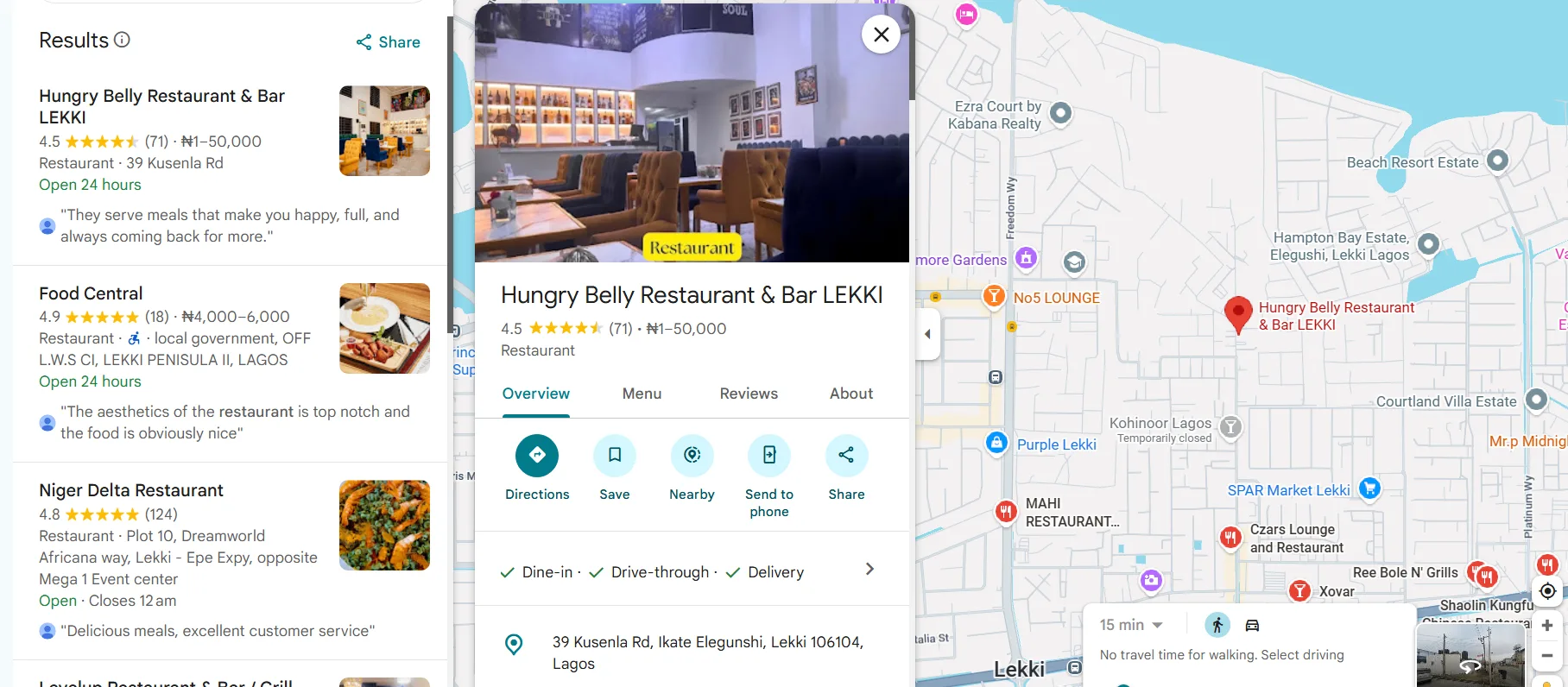
Why Does Google Maps Ranking Matter for Local Businesses?
Google Maps ranking matters because local customers often search when they are ready to act. Someone searching “dentist near me,” “hotel in Ikeja,” or “best restaurant in Sandton” usually wants a business they can call, visit, book, or message immediately.
The most valuable local placement is often the Google Map Pack, also called the local 3-pack. The Google Map Pack is the group of three local business results that appears with a map in Google Search. Businesses in those three positions usually receive more attention than listings lower down the page.
Google states that local ranking depends mainly on relevance, distance, and prominence. According to Google Business Profile Help, complete and accurate business information helps Google match businesses to relevant searches. Google also says there is no way to request or pay for a better local ranking.
Step 1: Claim and Verify Your Google Business Profile
Claiming and verifying your Google Business Profile gives you control over the business information that appears on Google Maps and Search. An unverified profile can show outdated hours, wrong phone numbers, incorrect categories, or user-suggested changes that reduce customer trust.
To claim and verify your profile, follow these steps:
- Go to Google Business Profile.
- Search for your business name.
- Claim the existing listing or create a new profile.
- Enter your official business name, address, phone number, website, and category.
- Complete the verification method Google provides.
- Check that your map pin sits on the exact location customers should visit.
Verification methods can vary by business, location, and account history. Many businesses receive phone, email, video, or postcard options, depending on Google’s requirements. The main verification options can differ by market, but the goal remains the same: prove that you represent the real business.
For African small and medium businesses, platforms like Destinali help strengthen local discovery by organizing verified business information across cities, categories, and search environments. Destinali covers 1M+ verified businesses across 54 African countries and 80+ categories, which reflects how important structured business data has become for local visibility.
Step 2: Complete Every Important Field in Your Profile
A complete Google Business Profile gives Google more information to match your business with the right local searches. Empty fields reduce relevance because Google has less evidence about what your business does, where you operate, and which customers you serve.
Complete these fields carefully:
- Business name
- Primary category
- Secondary categories
- Address or service area
- Phone number
- Website
- Opening hours
- Holiday and special hours
- Services or products
- Business description
- Attributes
- Photos and videos
- Booking, order, or messaging options where available
Your business description should include your main service, city, and customer value in natural language. A clinic might write, “Family medical clinic in Entebbe offering general consultations, lab testing, antenatal care, and health checks.” A clear profile description helps both Google and customers understand the business quickly.
Avoid adding keywords to your business name unless those words are part of your real registered or public-facing name. “Nairobi Dental Studio” is acceptable if that is the real name. “Nairobi Dental Studio Best Dentist Cheap Implants Westlands” can violate Google’s guidelines and may create suspension risk.
Step 3: Choose the Most Specific Business Category
Your primary business category is one of the strongest relevance signals in Google Maps SEO. A specific category helps Google understand which searches your business should appear for.
Choose the category that best describes your main business activity. A restaurant should not choose “Food and Drink” if “Ethiopian Restaurant,” “Pizza Restaurant,” or “Seafood Restaurant” better matches the business. A law firm should choose a precise legal category where available, such as “Personal Injury Lawyer” or “Family Law Attorney.”
Use secondary categories for important additional services. A hotel in Zanzibar might use “Hotel” as the primary category and add “Restaurant,” “Event Venue,” or “Conference Center” only if those services are genuinely offered.
Category accuracy matters more than category volume. A precise category can help a smaller business rank higher for the right search, while a broad category can place the business in irrelevant competition.
Step 4: Make Your Location Signals Consistent Everywhere
Consistent business information helps Google connect your website, Google Business Profile, directories, social profiles, and customer references to the same real-world business. Name, address, and phone number consistency is especially important for local ranking and customer trust.
Use the same format for your business name, address, and phone number across:
- Google Business Profile
- Website contact page
- Facebook, Instagram, LinkedIn, and TikTok profiles
- Local directories
- Industry platforms
- Booking platforms
- Review sites
- Delivery or marketplace listings
A business in Accra should not appear as “Adom Beauty Spa” on Google, “Adom Spa Ltd” on Facebook, and “Adom Beauty Salon East Legon” on a directory unless those variations are clearly connected. Inconsistent local data can make Google less confident about the business identity.
Add a contact page to your website with your exact address, embedded Google Map, service areas, phone number, and opening hours. Local consistency reinforces the same location signals across the web.
Step 5: Get More High-Quality Google Reviews
Reviews improve Google Maps performance because reviews influence both prominence and customer decision-making. Google says more reviews and positive ratings can help local ranking, and customers often compare star ratings before calling or visiting a business.
To get more reviews, use a simple process:
- Ask satisfied customers shortly after a successful service.
- Send your Google review link by WhatsApp, SMS, email, or receipt.
- Ask for honest feedback, not only five-star ratings.
- Train staff to request reviews at the right moment.
- Reply to every review with a professional response.
- Use negative reviews to fix real service issues.
A review profile with 4.6 stars and 180 detailed reviews often looks more trustworthy than a perfect 5.0 rating with five short reviews. Review quantity, freshness, sentiment, and response quality all help customers decide whether the business feels credible.
The most effective review request methods are simple, timely, and ethical. Never buy fake reviews, review your own business, or offer rewards for only positive ratings.
Step 6: Add Photos That Prove Your Business Is Active
Photos help customers trust your business before they visit, call, or book. Google can also use visual content to better understand your products, location, and services.
Add photos that show:
- Storefront or building entrance
- Interior space
- Team members
- Products
- Service delivery
- Menu items
- Guest rooms
- Equipment
- Before-and-after results where appropriate
- Events or customer experience
A hotel in Mombasa should show rooms, reception, breakfast area, exterior signage, and nearby landmarks. A salon in Kumasi should show the interior, workstations, hairstyles, staff, and hygiene standards. Real photos usually perform better than generic stock images because customers want proof that the business exists and operates professionally.
Google has reported that businesses with photos receive more direction requests and website visits than businesses without photos. A strong photo strategy helps your listing stand out when customers compare several nearby options.
Step 7: Use City and Service Keywords Naturally
Local keywords help Google understand which city, area, and service your business is relevant for. The best keywords describe what you do and where you do it without sounding forced.
Use city-based keywords in:
- Business description
- Services
- Products
- Google Posts
- Website title tags
- Website headings
- Contact page
- FAQ content
- Image file names where appropriate
A plumber in Kampala might mention “emergency plumbing in Kampala,” “water heater repair,” and “blocked drain cleaning.” A restaurant in Kigali might mention “Rwandan restaurant in Kigali,” “group dining,” and “lunch near Kimihurura.”
Keyword stuffing can reduce trust and create a poor customer experience. The goal is not to repeat the same phrase many times. The goal is to describe your services clearly in the language your customers use.
Step 8: Build Local Citations and Trusted Mentions
Local citations are mentions of your business information on websites, directories, apps, platforms, and local publications. Citations support prominence because they show that your business exists beyond one Google profile.
Good citation sources include:
- Local business directories
- Industry directories
- Tourism platforms
- Hotel and restaurant platforms
- Chamber of commerce websites
- Local news features
- Supplier pages
- Partner websites
- Professional associations
A guesthouse in Soweto can benefit from listings on tourism platforms, accommodation directories, and local discovery websites. A clinic in Lagos can benefit from healthcare directories and professional association mentions. A real estate agency in Nairobi can benefit from property portals and neighborhood content.
Quality matters more than volume. Ten accurate listings on trusted local and industry platforms are usually more valuable than 100 low-quality directory submissions with inconsistent details.
Step 9: Keep Your Profile Active Every Week
An active Google Business Profile signals that the business is open, managed, and useful to customers. Profile activity also gives customers fresh reasons to choose your business.
Update your profile weekly with:
- New photos
- Google Posts
- Offers
- Events
- Product updates
- Service changes
- Holiday hours
- Review replies
- Q&A answers
A restaurant can post weekly specials. A clinic can announce vaccination days or extended hours. A real estate agency can post new property types or neighborhood updates. A salon can post seasonal packages or recent work.
Google wants to show businesses that are reliable for the searcher’s moment. Accurate hours are especially important because Google may prioritize businesses that are open when the customer searches.
Step 10: Track Rankings, Calls, Messages, and Direction Requests
Tracking helps you know whether your Google Maps work is producing business results. Ranking alone is not enough because a higher position should lead to more calls, direction requests, bookings, messages, or website visits.
Measure these signals every month:
- Searches that showed your profile
- Calls from your profile
- Website clicks
- Direction requests
- Messages or bookings
- Review growth
- Average star rating
- Photo views
- Ranking for core city keywords
Use manual checks carefully because Google Maps rankings change by searcher location. A business may rank first from one neighborhood and fifth from another. For a better view, track multiple search points across the city or use a Google Business Profile ranking checker.
Focus on commercial searches that matter. A dentist should track “dentist in Abuja,” “teeth whitening Abuja,” and “emergency dentist near me,” not only the business name.
What Should You Avoid When Trying to Rank Higher on Google Maps?
Some shortcuts can damage your visibility instead of improving it. Google Maps ranking improves when customers and search systems see accurate, trustworthy business signals.
Avoid these mistakes:
- Adding fake keywords to your business name
- Using a virtual office that customers cannot visit
- Creating duplicate profiles for one location
- Buying fake reviews
- Choosing unrelated categories
- Hiding important service details
- Ignoring negative reviews
- Leaving old opening hours online
- Using stock photos instead of real images
- Listing different phone numbers across platforms
Google can suspend profiles that violate guidelines. More importantly, customers lose trust when business information looks inconsistent or misleading.
FAQ
How Do You Get Ranked Higher on Google Maps?
You get ranked higher on Google Maps by improving relevance, distance signals, and prominence. Complete your Google Business Profile, choose the correct category, add services, collect honest reviews, keep your information consistent, and earn trusted local mentions. Google uses these signals to decide which businesses best match a local search.
Can You Rank Higher on Google Maps for Free?
Yes, you can rank higher on Google Maps for free by optimizing your Google Business Profile, adding photos, collecting reviews, updating hours, and improving local citations. Google states that businesses cannot request or pay for better organic local ranking. Paid ads can increase visibility, but ads do not replace organic Google Maps optimization.
Is 4.2 a Good Google Rating?
A 4.2 Google rating is acceptable, but many customers compare ratings closely when choosing between similar businesses. A business with 4.2 stars may still win customers if reviews are recent, detailed, and professionally answered. A rating closer to 4.5 or higher usually creates stronger trust in competitive categories like hotels, clinics, restaurants, and salons.
How Do You Get a 5.0 Rating on Google?
A business gets a 5.0 Google rating by delivering consistent service and asking satisfied customers for honest reviews. A perfect score is easier with a small number of reviews, but larger businesses often settle naturally between 4.5 and 4.9. Customers may trust a 4.8 rating with 300 reviews more than a 5.0 rating with only six reviews.
How Do You Get 4.9 on Google Reviews?
A business gets to 4.9 on Google reviews by increasing positive review volume while reducing repeat service problems. Ask customers soon after a good experience, respond to all reviews, and fix common complaints quickly. A 4.9 rating usually requires both excellent service and a steady flow of new five-star reviews.
How Long Does Google Maps SEO Take?
Google Maps SEO can show early improvements within a few weeks, but stronger results often take two to six months. The timeline depends on competition, profile quality, review growth, citation consistency, and website strength. A new restaurant in a competitive city may need more time than a niche service provider in a smaller market.
What to Do Now
- Claim and verify your Google Business Profile.
- Complete every profile field with accurate city, service, and contact details.
- Choose the most specific business category.
- Fix inconsistent business information across the web.
- Ask satisfied customers for honest Google reviews.
- Add real photos that show your location, team, products, and services.
- Publish weekly updates and keep opening hours accurate.
- Track calls, messages, direction requests, and rankings every month.
Businesses that rank higher on Google Maps usually have better data, stronger reviews, fresher content, and more local trust signals than their competitors. Consistent execution is what turns a basic listing into a reliable source of local customers.
African businesses that want stronger local visibility can create a free listing to help more customers find and contact them online.
Destinali helps local businesses improve online visibility, discoverability, and customer acquisition across search engines, AI systems, maps, and local search platforms.
List your business →